Roger J. Wendell
Defending 3.8 Billion Years of Organic EvolutionSM

|
UNIX, Linux, and Raspberry Pi |

|
Click Here for my main computer page... |
|
|
Click Here for my PERL page... |
UNIX
(UNiplexed Information and Computing System - originally spelled "Unics")
"When Ken Thompson and Dennis Ritchie first wrote Unix at AT&T Bell Labs [1969], it was for their own use and for their friends and coworkers. Utility programs were added by various people as they had problems to solve. Because Bell Labs wasn't in the computer business, source code was given out to universities for a nominal fee. brilliant reserachers wrote their own software and added it to Unix in a spree of creative anarchy, which has been equaled only with Linus, in the introduction of the W Widnow System, and especially the blend of Mac and Unix with Darwin included in Mac OS X."
- Shelley Powers, Jerry Peek and Mike Loukides in O'Reilly's UNIX Power Tools, 3rd ed., p.3.
Open Source and Linux
"If you haven't heard of Linux yet, you need to read the newspaper a little more often! Linus Torvalds, while a student, expressed his frustration over the high cost of most versions of UNIX by building his own. What makes this story special is that Torvalds licensed his UNIX clone, dubbed Linux, in a unique way. Linux is an open source operating system, distributed under the terms of the GNU General Public License (GPL), which means (among other things) that anyone who purchases a copy receives full access to it source code, the building blocks of the operating system. Free access to the source code gives software developers the power to modify the operating system to meet their needs. This has led to the rapid development of a wide variety of applications, including some of the most commonly used web and e-mail servers on the Internet. In most cases, both the Linux operating system and Linux applications are available for free download from the Internt, although vendors like SuSE and Caldera sell boxed versions, and charge for support services. For all intents and purposes, Linux is a full featured clone of UNIX."
Some basic UNIX Commands and Definitions:
|
|
|
Some UNIX related links:
|
|
Linux for servers Macintosh for graphics Palm for mobility Windows for solitaire |
Some vi Commands:
|
|
Other Reference Materials:
total 3960
-rw-r--r--   1 e-zeek   usr       123339 Jun  8 10:41 getstats_12.c
-rwx------   1 e-zeek   usr       103316 Jul 16 00:04 hexpert
-rw-------   1 e-zeek   usr        32768 Jul 16 00:03 hexpert.tar
-rwx------   1 e-zeek   usr        10056 Sep 26 18:46 htpasswd
drwx------   6 e-zeek   usr          512 May  4 12:31 java
-rw-------   1 e-zeek   usr        22768 Oct  4 17:32 siggraph.jpg
-rw-------   1 e-zeek   usr      1312180 Sep 28 11:53 siggraph.tiff
-rw-------   1 e-zeek   usr       373760 Aug 30 20:27 unz512x.tar
Here's a breakdown of what the information in these lines mean.
The part on the left looks like this:
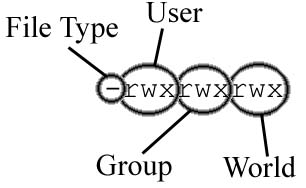
The character at the far left tells you what kind of file this item is. If it is a dash "-" then that means it is a normal file. If it is a "d" that that means it is a directory (folder). There are other characters but those are the two most important ones. After the character on the far left there are three groups of three characters. These groups indicate the permissions of the file or directory. Permissions determine who can read from the file or write to the file. The "r" means read permission, the "w" means write permission, and the "x" means execute permission. A dash "-" means that that permission is not granted.
The first group of the permission bits corresponds to the user's permission i.e., the owner or person who created the file. The second group of permission bits corresponds to the group's permissions. Each file or directory belongs to a group which could be students or usr as in my example above. Anyone who belongs to this group has these permissions for the file. If you'd like to see what groups you belong to, type the command groups.The third group of permission bits corresponds to the world permissions, which are permissions that are granted to everyone.
Continuing on down the line of items, in the above example you'll see e-zeek. This is the username of the owner of the file. This is normally the person who created the file.
Next is the group the file belongs to. In the above example, the files belong to the group usr. After that you'll see the size of the file in bytes. Next is the date and time the file was last modified, and finally the name of the file.
There are several Unix commands that you will need to become familiar with.
chmod will change the permission bits of the file or directory.
There are two ways to use chmod. One way is to give it the exact permissions
with the absolute mode. This is essentially a three digit number with the
first digit corresponding to the user's permissions, the second digit is the
group permissions, and the last digit is the world permissions. The values of
the digit correspond in the following way:So for example, the command:
0 --- 1 --x 2 -w- 3 -wx 4 r-- 5 r-x 6 rw- 7 rwx
chmod 664 test.html
would change the permissions of the file test.html to be rw-rw-r--.The second method of changing permissions is using the symbolic mode. The general format for the symbolic mode is:
who <operator> permission
So, here's some examples:
- who - who specifies which permission group we are changing. Possible values are:
- u - user's permissions
- g - group's permissions
- o - other's permissions
- a - all permissions (user, group, and other)
- operator - specifies which action to take. Possible values are:
- + - Adds the permission
- - - Removes the permission
- = - Sets the permission exactly
- permissions - specifies which permission bit to change. The ones we are concerned with are:
- r - the read bit
- w - the write bit
- x - the execute bit
If the permissions are currently rwx------, then the command:
chmod a+r example.html
will change it so everyone (all) can read it (add). The result would then be rwxr--r--.If the permissions are currently rwx------, then the command:
chmod u=r another_example.html
will change it so the user can only read it (exact set). The result would then be r--------.
mkdir will make a new directory. The command:
mkdir public_html
will make a new directory public_html as long as you have write access in the current directory.
rm will remove a file. The command:
rm test.html
will remove the file test.html
rmdir will remove a directory as long as it is empty. Example:
rmdir test_dir
will remove the directory test_dirman
man will become your friend. It will grab the manual page for a given command. So for instance:
man ls
will give you the manual page for the command ls. You can use it to learn a lot of advanced information
about a command. Note that some systems do not have all the manual pages installed. You can ask the
administrator to install them, or use another system.
Now we'll take a look at how permissions affect us on the Web. The first step is understanding the public_html directory. If you are creating a home page, and wish to put it in your home directory, you first need to make a public_html directory in your home directory. For instance, if I wish to access my own home page, whenever I access http://www.rogerwendell.com/unix/~e-zeek/ this will look in my public_html directory for the files. This is a bit of a security feature so that people can look at the other files in your home directory. The command will look like this:
mkdir public_html
The permissions for the public_html should be something like rwx-----x. You can have other permission bits, but this is the minimum that you will need. The command
chmod 701 public_html
will do the trick. It is a popular misconception that you need to change the permissions of your actual home directory, this is not ture!Another thing to mention is that if you want people to browse through the directory, then you should also make it world readable. The permissions will be rwx---r-x. When I say browse the directory, I mean something like this: Browse. If you click on that link, then you can see what I mean. When you do not have an index.html file, you can browse the directory.
Now you need to regard yourself with the permissions of an HTML document. The only requirement for an HTML document is that the web server can read it. This means that you need to make your file world readable. After changing into your public_html directory like this:
cd public_html
and you create an HTML document with your favorite editor, you can use the command
chmod o+r some_document.html
to set the permissions correctly. Another way to do it is:
chmod 604 some_document.html
This sets it to rw----r--. This is so you can still read and write to the file, and the web server can get the document. We could ramble on this subject for a much longer time, but let's get on to making some HTML documents. If you have more problems or you need some more specific information, don't hesitate to ask someone..
RSX-11M
Okay, RSX-11M doesn't have much to do with UNIX but I mention it here because it was my first real experience with an operating system not related to Microsoft. In the late 80s I was an Electronics Technician where we were using RSX-11M for process control. I don't remember much about it now, two decades later as I'm adding this entry in 2008, but have fond memories of the huge PDP-11 computers, stacks of platters (discs) and other related equipment that'll be fun to encounter in a museum somewhere!
Raspberry Pi
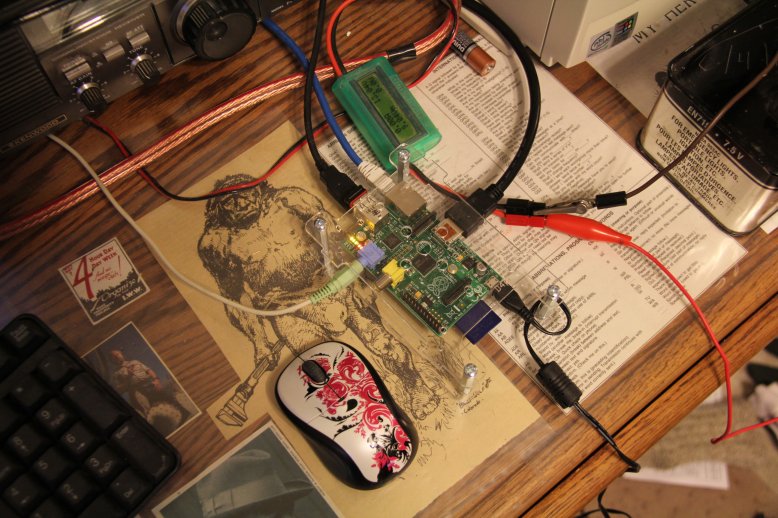
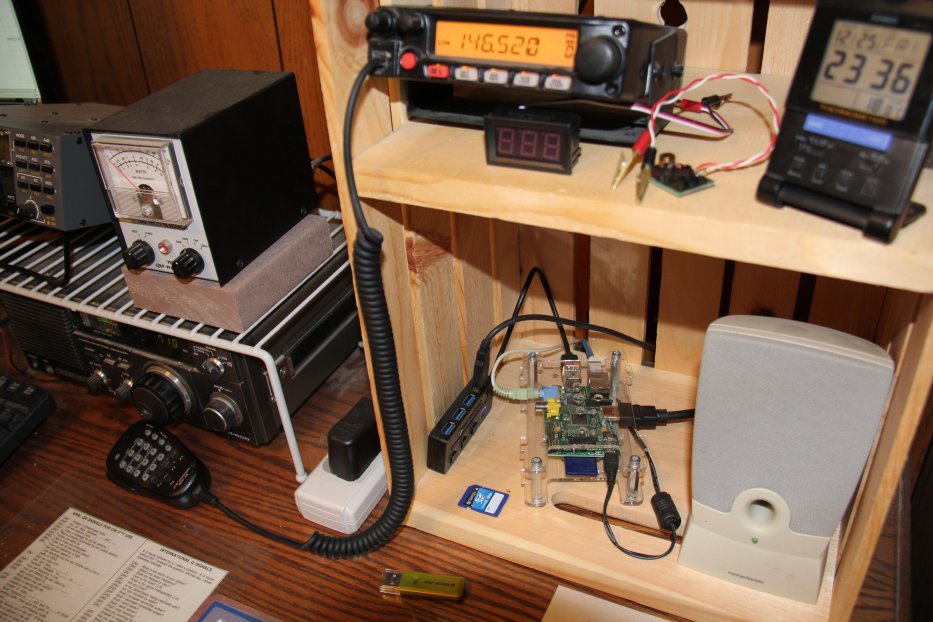
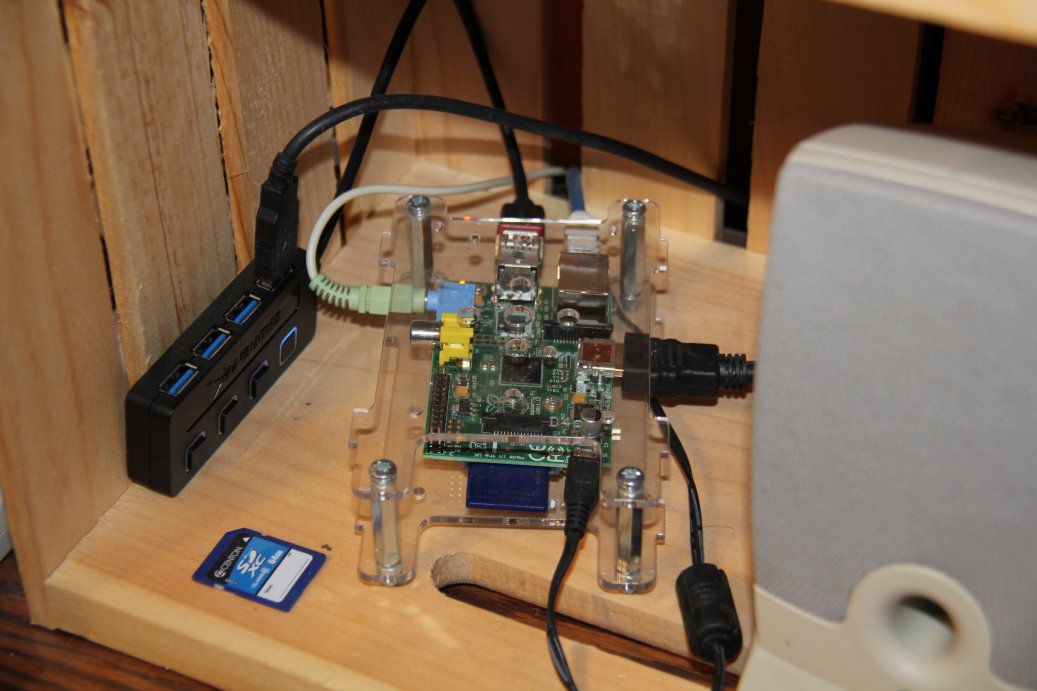
In early 2014 I purchased (and experimented with!) my first Raspberry Pi (The Model "B" that you see in these photos).The Raspberry Pi is a series of credit card-sized single-board computers developed in the United Kingdom by the Raspberry Pi Foundation with the intention of promoting the teaching of basic computer science in schools and developing countries. The price, at the time of my purchase, was $35.00 USD for the basic board and model. The original Raspberry Pi and Raspberry Pi 2 were manufactured in several board configurations through licensed manufacturing agreements with Newark element14 (Premier Farnell), RS Components and Egoman. The hardware is the same across all manufacturers. In short, although not nearly as powerful as a "regular" computer, laptop, or smartphone the Raspberry Pi remains a ton of fun that has also had a lot of practical applications in my personal office space and amateur radio shack.
|

|
|
|
Links:
|
|
 Back to Roger J. Wendell's Home Page...

Abbey |
About |
Blog |
Contacting
Me |
Copyright |
Disclaimer |
Donate |
Guest
Book |
Home |
Links |
Site
Index |
Solutions |
Terms,
Conditions
and
Fair
Use |
What's
Changed
or
New?
Copyright
© 1955 -